Games built by AI: Claude Haiku vs Sonnet vs Opus
Claude Haiku, Sonnet and Opus 5.5 each got the same prompt in an empty folder: one try, no help, working alone in Claude Code. Some live shows gave the job to Opus 5.5 alone. These are the 23 things they made. Play them side by side and see how each one was made.
Times are how long each session ran. Costs are at API list price. Every step of every session is public on Tested Locally.
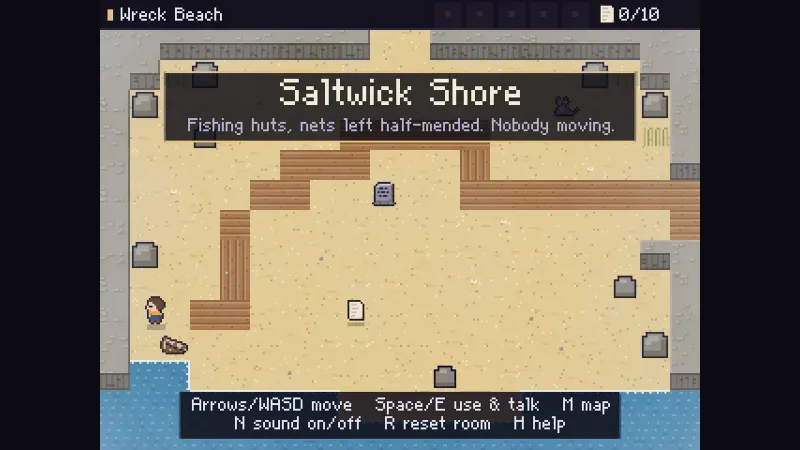
19A 2D adventure with locked gatesLive show · 2 November 2026
Build a 2D adventure game that runs in a web browser: a world seen from above, where each part of it opens up with what you find in the part before. Put your best into the map, the story, the levels and how it plays.Show the whole prompt
The map: - One connected map made of zones, each with its own look, mood and music. - Each zone holds a new item or ability that opens the way into the next: a new way to move, a tool, a key for a kind of gate. Earlier zones hide shortcuts and secrets you reach when you come back with it. - Every zone has puzzle rooms built on what you have found so far, and the last zone brings all of it together. - A map screen fills in as you explore, marking where you have been and the gates still to open. The story: - Who you are and why you are there comes out through what you find as you play: notes, carvings and characters to talk to. - It builds to a clear ending in the last zone, where everything you found along the way comes together. - It is a world of its own, with its own places, people and names. How it plays: - Arrow keys or WASD to move, a key to use or talk, one to open the map and one to turn the sound on and off. - Progress saves in the browser, so a reload carries on where you left off. - The player can always find a way forward: every room has a way out, what you find stays with you, and any puzzle can be reset. Prove it can be finished: - The map, zones, gates, items and puzzles live in data files the game is built from. - Write a checker that reads that data and proves the game can be finished from the start: every gate opens with what can be reached before it, every puzzle has a solution, and the player can always go on. Run it after every change. - Write a bot that plays the real game in the browser from start to end along the checker's route, and record its playthrough as a video. When it is done, hand it over: - A picture of the whole map with the zones, gates, items and secrets marked. - The checker's report and the bot's playthrough video. - A README: the story, the zones in order and what opens each one, how each puzzle works, and how to run the checker and the game. Build it with any stack you like; this machine has Node, Python, ffmpeg, ImageMagick and headless Chrome. Make every tile, sprite, sound and tune yourself. When it is done, start it on a local server and print the URL.
Served as built.
- Claude Opus 5.5
Hushlight
A top-down puzzle adventure on an island whose lighthouse has gone dark: each zone holds the item that opens the next, and the story comes together from log pages and carvings.
2h 07m 57s · $28.81 · 143 tool calls · 8,054 lines
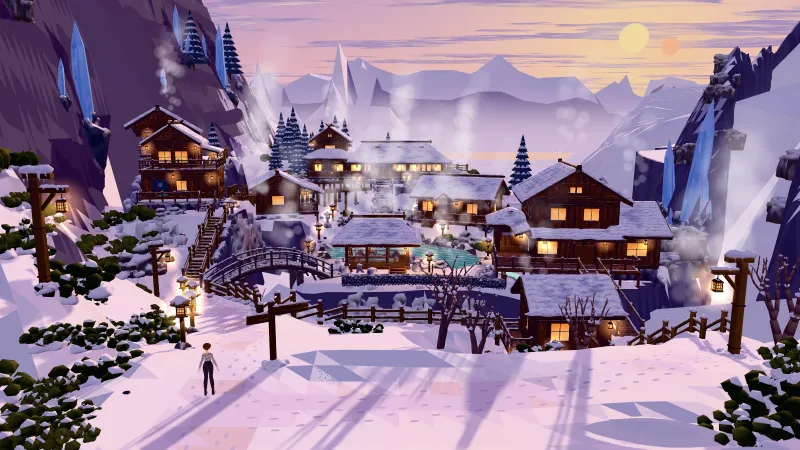
18Hot Spring PassLive show · 30–31 October 2026
Build a small 3D world that a viewer can explore in a web browser, from one concept painting: a snowy hot spring hamlet in a mountain pass on a made-up planet, at dusk under two suns. The painting is `area/concept.png`. It is seen from just behind and above the arrival point, where the girl stands on the snow, looking up the valley.Show the whole prompt
Make it low-poly, like a game's first pass: simple shapes with flat or gently cel-shaded faces, in the painting's colours and light. Everything in the painting should be there, in its place: every building, bridge, staircase, deck, fence, lamp post and lantern, every pool and stream, the rocks, trees, bushes and ice crystals, the cliffs and slopes, the paths and snow, the mountains and the sky with its two suns. Fill in what the painting does not show (behind the buildings, beyond its edges) so the place holds up from any angle. Our character sets the scale for everything. She is `character/base.vrm` (VRM 1.0), and these are her numbers: - 1.65 m from soles to crown; eyes at 1.54 m, shoulders at 1.29 m, hips at 0.92 m, knees at 0.52 m; 0.31 m across the shoulders; arm span 1.45 m. - She walks at 1.4 m/s and runs at 4 m/s. She steps up anything up to 0.35 m without jumping, jumps 0.9 m high and walks up slopes of up to 40°. Her collision shape is a capsule 0.3 m in radius and 1.65 m tall. Size every door, step, railing, path, roof, pool, bridge and lantern for her, as a real place would be, and keep the painting's sense of scale: in it she is the small figure on the snow in front. Let the viewer explore as her: - She arrives where the girl stands in the painting, and walks, runs and jumps in third person with the camera following. - She bumps into buildings, fences, rocks and trees, climbs the stairs, crosses the bridge, and can't walk off the edge of the world. - One key switches to a free-flying camera. Another moves the camera to the painting's own viewpoint, so the two can be compared. Build it so it can be rebuilt and reworked piece by piece: - Each kind of thing (each building, the bridge, a fence section, a lantern, a fir tree, a boulder) is its own model, made once and placed as many times as it appears; nothing is merged into one big mesh. - The terrain, paths and water are made from data that can be edited, and every placement (what, where, which way it faces, how big) is in one file the world is built from. - One command rebuilds the whole world from scratch. When it is done, hand it over: - A list of every kind of thing you made: its name, how many times it appears, its size in metres (width, depth and height), and a picture of it on its own. - A top-down plan of the whole area with a scale bar, and a picture from the painting's viewpoint next to the painting. - A README: how it is built, the scale you chose and why, and what the painting left you to invent. Build it with any stack you like; this machine has Node, Python, Blender 5.2 (`blender`, runs headless), ffmpeg, ImageMagick and headless Chrome, and no Unity, Unreal or Godot. Make every model and texture yourself, in code or in Blender; no downloaded asset files (code libraries are fine). Add ambient sound made in code: wind, the hot springs bubbling, a distant stream. It should run smoothly in a browser on a laptop. When it is done, start it on a local server and print the URL.
Built by Opus 5.5 over six live runs: the world from one painting, then rounds that rebuilt its models set by set from our pictures, a fix round after our playtest, and a last round with our hand-painted textures and a character from our anime cast. The prompt here is the first run’s; this is the world after the last. Time, cost and tool calls are all six runs together.
Served as built. It is a large download: about 100 MB of models and textures.
- Claude Opus 5.5
Hot Spring Pass
A cel-shaded hot spring hamlet in a snowy mountain pass at dusk under two suns, built from one concept painting: walk its paths and bridges and into its houses.
15h 39m 04s · $269.01 · 1654 tool calls · 46,912 lines
13Home in 3DLive show · 27 October 2026
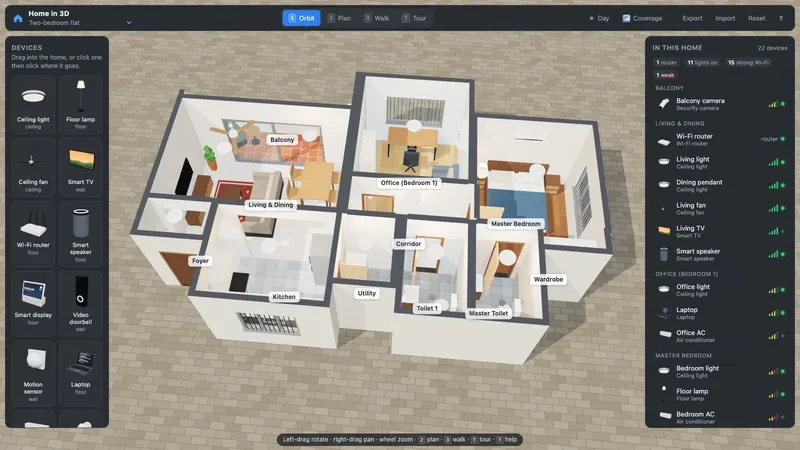
All three sessions side by sideBuild a web app that turns an apartment's floor plan into an interactive 3D home where you place smart-home devices. Build it with any stack you like; this machine has Node, Python, Blender 5.2 (`blender`, runs headless), ffmpeg, ImageMagick and headless Chrome. Make every model and texture yourself, in code or in Blender; no downloaded asset files (code libraries are fine).Show the whole prompt
The apartment is a real two-bedroom flat. Measurements are in metres, from the builder's plan: x runs left to right across the plan, y runs top to bottom, and (0, 0) is the outer top-left corner of the balcony. Walls are 0.15 m thick and 2.9 m high. - Balcony: x 0.00 to 4.87, y 0.00 to 1.19 (open above a 1 m parapet) - Living and dining: x 0.00 to 4.87, y 1.30 to 4.64 - Bedroom 1, used as an office: x 5.17 to 8.22, y 0.00 to 3.50 - Master bedroom: x 8.45 to 11.65, y 1.30 to 4.65 - Wardrobe, in the master bedroom: x 10.10 to 11.61, y 4.65 to 5.25 - Corridor, 1.1 m wide: x 5.17 to 8.45, y 3.60 to 4.70 - Foyer, the entrance: x 0.00 to 1.66, y 4.75 to 5.74 - Kitchen: x 1.85 to 4.90, y 4.80 to 7.24 - Utility: x 5.04 to 6.40, y 4.80 to 6.62 - Toilet 1: x 6.70 to 8.23, y 4.80 to 7.24 - Master toilet: x 8.43 to 9.96, y 4.80 to 7.24 Doors: the front door is in the foyer's bottom wall; a wide sliding door joins the living room and the balcony; the office and the master bedroom open off the corridor; toilet 1 opens off the corridor; the master toilet opens from the master bedroom side, by the wardrobe; the kitchen is open to the foyer and the living room; the utility opens from the kitchen. Windows: in the office's top wall, the master bedroom's right wall and the kitchen's bottom wall. What to build: - Build the home procedurally, in code, from these numbers, and keep the plan in a data file of its own, so that swapping in another flat's plan rebuilds the whole home. From it: floors, walls with door and window openings, the balcony parapet, each room labelled, and floor finishes that suit each room (wood in the bedrooms, tiles in the kitchen and toilets). From above it should be recognisably this plan. - Three ways to look: an orbit view from above; a top-down plan view with the measurements; and a walk-through at eye height (keyboard and mouse) that respects the walls and goes through the doors. Add a guided camera tour that visits every room, started with one key. - Smart devices: a palette of at least eight kinds (for example ceiling light, lamp, TV, Wi-Fi router, smart speaker, smart display, video doorbell, motion sensor, laptop, air conditioner), each with its own simple 3D model (made in code or in Blender). Drag one into the home to place it; it snaps to the floor, a wall or the ceiling as suits the device. Select a placed device to move, rotate, rename or remove it. - Each device has a status card. Lights turn on and off and dim, and actually light their room; a TV or display shows something on its screen when on; battery devices show a battery level; every device shows its Wi-Fi signal, worked out from its distance to the router and the walls in between. - A Wi-Fi coverage overlay on the floor from the router's position, weaker through walls, that updates when you move the router. - Day and night lighting. - Save the layout in the browser so it survives a reload, and export and import it as a JSON file. No sound is needed; if you add any, keep it quiet by default and add a mute button. It should run smoothly in a browser on a laptop. When it is done, start it on a local server and print the URL.
Judged by Fable 5.1. Fable 5.1 used each app for about eight minutes, live on the show, and scored it. Scored on works, looks, fun, out of 15. Haiku lost about five of its eight minutes, and Opus about two and a half, to the show’s own preview server, not to their code.
Served as built, with two changes: Haiku’s page loaded its files from the server’s root, so those paths were made relative, and the flat’s city was taken out of the prompt and of the builds’ labels.
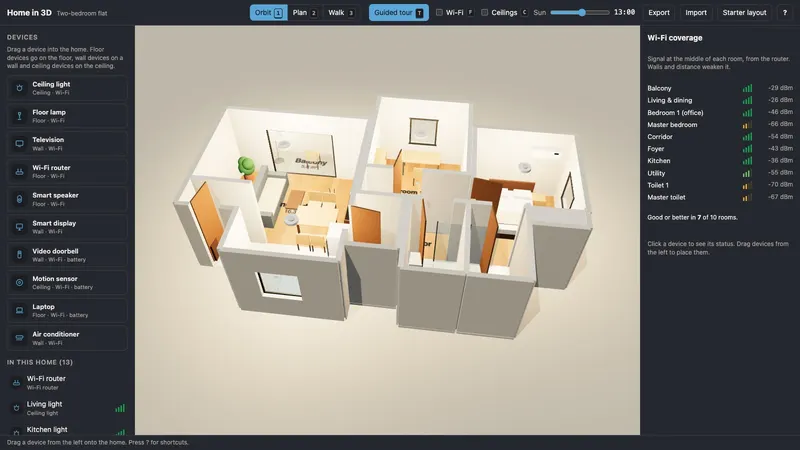
- Claude Haiku 5.5
Home in 3D
The flat in 3D with orbit, plan and walk views, a Wi-Fi heat map, a guided tour, and smart devices you drag in and switch on.
19m 52s · $1.15 · 44 tool calls · 4,134 lines
Fable 5.1: 10 of 15
- Claude Sonnet 5.5
Home in 3D
A smart-home planner: drag devices into the flat, light its rooms, and watch the Wi-Fi coverage change as you move the router.
40m 14s · $5.24 · 71 tool calls · 4,940 lines
Fable 5.1: 12 of 15
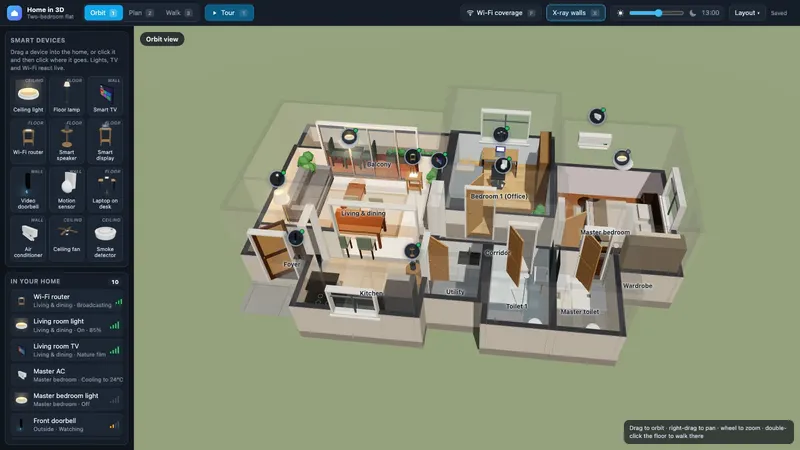
- Claude Opus 5.5
Home in 3D · Smart device planner
A smart-device planner for the flat with orbit, plan and walk views, live device cards and a Wi-Fi coverage overlay.
40m 00s · $9.41 · 86 tool calls · 3,731 lines
Fable 5.1: 12 of 15
12Coastal villageLive show · 27 October 2026
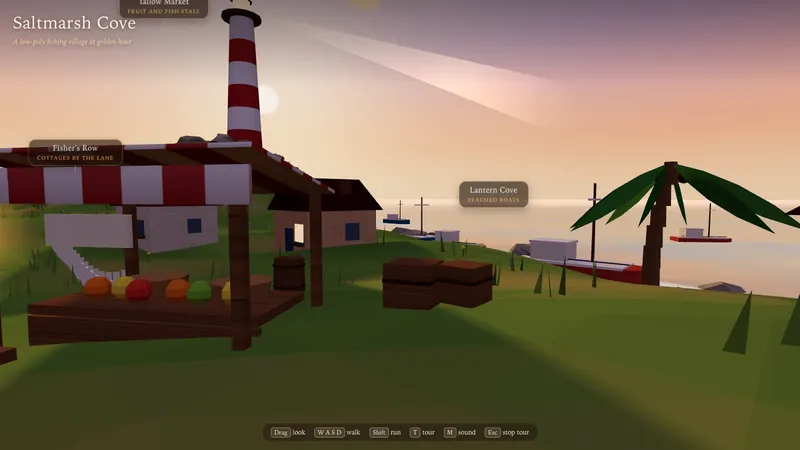
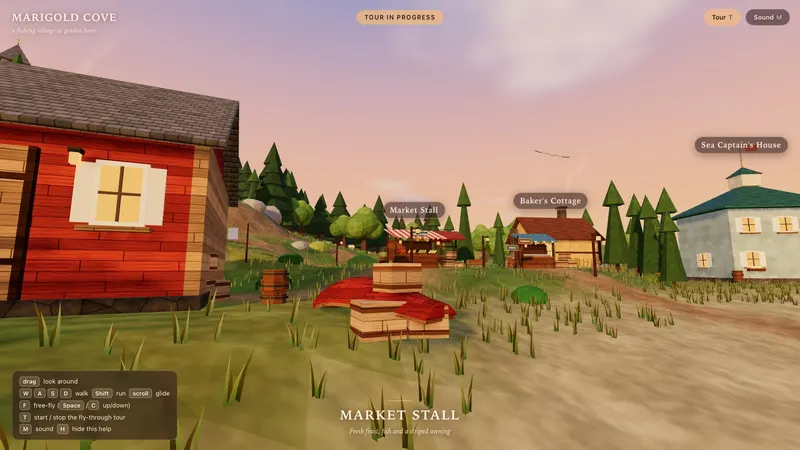
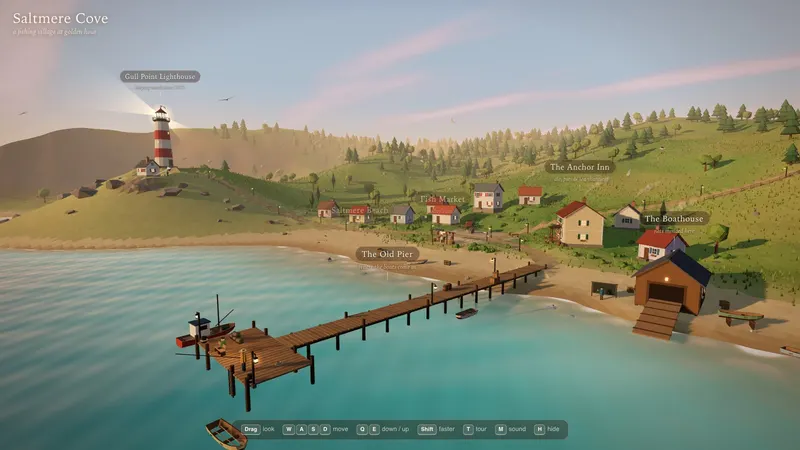
All three sessions side by sideBuild a small 3D environment that a viewer can explore in a web browser: a low-poly coastal village at golden hour. Build it with any stack you like; this machine has Node, Python, Blender 5.2 (`blender`, runs headless), ffmpeg, ImageMagick and headless Chrome, and no Unity, Unreal or Godot. Make every model, texture and sound yourself, in code or in Blender; no downloaded asset files (code libraries are fine). The scene needs varied terrain with a beach, a hill and a path; the sea with gentle waves; at least five distinct buildings (houses, a lighthouse, a market stall, a dock); natural props (trees, rocks, grass, flowers); details that make it feel lived in (boats, crates, lanterns, fences); and lighting that sets a mood (warm sun, soft shadows, sky colour and a little fog). Let the viewer drag to look around, and add a slow automatic fly-through tour that starts with one key. Show each landmark's name on screen when it is in view, and add ambient sound (waves, wind, gulls) made in code. It should run smoothly in a browser on a laptop. When it is done, start it on a local server and print the URL.
Judged by Fable 5.1. Fable 5.1 watched each village’s fly-through tour and scored it. Scored on prompt, looks, atmosphere, tour, out of 20.
Served as built. The only change: Haiku’s page loaded its files from the server’s root, so those paths were made relative to run from this folder.
- Claude Haiku 5.5
Saltmarsh Cove
A low-poly fishing village at golden hour: a striped lighthouse, a windmill, a market stall and a dock, with a slow fly-through tour.
18m 10s · $1.23 · 85 tool calls · 2,714 lines
Fable 5.1: 14 of 20
- Claude Sonnet 5.5
Marigold Cove
A fishing village at golden hour with a shader sea, a chapel on the hill, boats on the swell and sound that follows where you stand.
31m 55s · $4.72 · 100 tool calls · 3,249 lines
Fable 5.1: 17 of 20
- Claude Opus 5.5
Saltmere Cove
A cove of red-roofed cottages, an inn, a pier and a lighthouse on its headland, with villagers about and a guided fly-through.
37m 27s · $8.09 · 65 tool calls · 3,339 lines
Fable 5.1: 17 of 20
113D world questLive show · 26 October 2026
All three sessions side by sideMake a 3D exploration game, first person or third person (your choice), with a playable character in a world worth exploring: varied terrain, landmarks, buildings or ruins, and things to discover. Build it with any stack you like; this machine has Node, Python, Blender 5.2 (`blender`, runs headless), ffmpeg, ImageMagick and headless Chrome, and no Unity, Unreal or Godot. The finished game must be playable in a web browser: start it on a local server and print the URL. Make every model, texture and sound yourself, in code or in Blender; no downloaded asset files (code libraries are fine). The world has two puzzles, of your own design. Include a start screen with the controls, an objective tracker that updates as the player progresses, an on-screen prompt when something can be used, sound and music, and a win screen.
Haiku 5.5 stopped a minute after its first start and was started again in a fresh folder; this is that second run.
Judged by Fable 5.1. Fable 5.1 played each game for up to half an hour with keyboard and mouse tools and scored it. Scored on works, looks, fun, out of 15. Opus’s camera turns with the mouse once the page captures it, which the judge’s tools couldn’t do yet, so it played facing one way.
Served as built, with two changes: Haiku’s page loaded three.js and its own files from the server’s root, so three.js was copied next to it and the paths made relative; Opus’s Vite app was rebuilt with relative paths.
- Claude Haiku 5.5
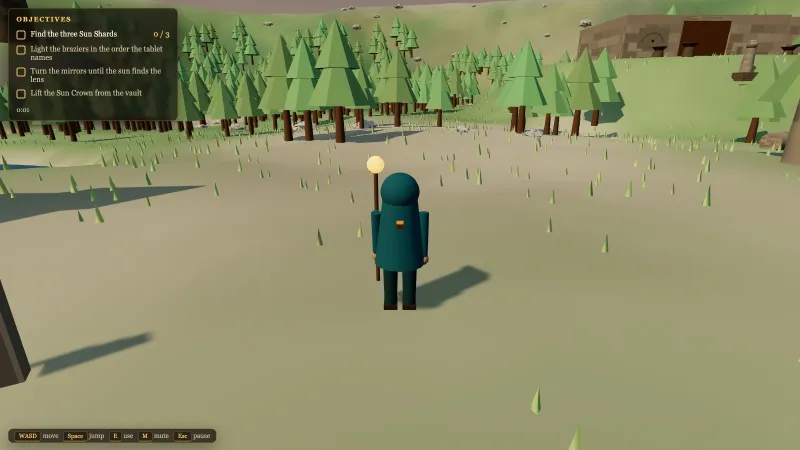
The Sun Crown of the Valley
A third-person valley of ruins: find three Sun Shards, light the braziers in the right order, turn the mirrors until the sun finds the lens, and lift the Sun Crown.
27m 03s · $1.11 · 65 tool calls · 3,010 lines
Fable 5.1: 11 of 15
- Claude Sonnet 5.5
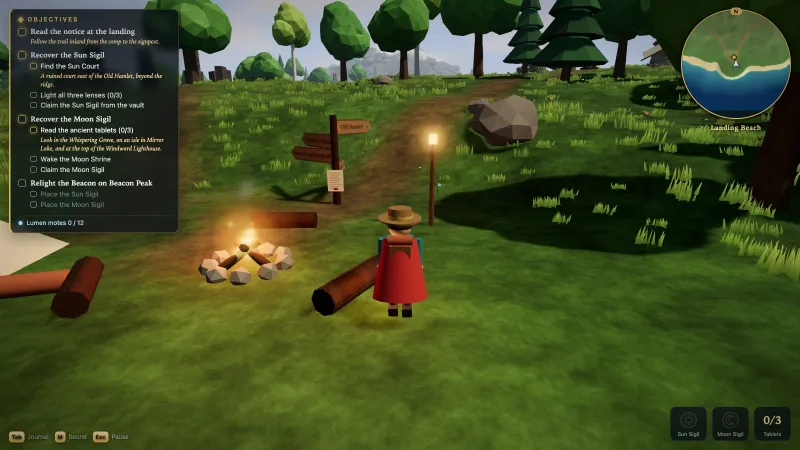
The Last Beacon
Wash up on a forgotten island, read what the old keepers carved, solve two puzzles and climb Beacon Peak to relight its beacon.
54m 52s · $8.42 · 129 tool calls · 4,751 lines
Fable 5.1: 13 of 15
- Claude Opus 5.5
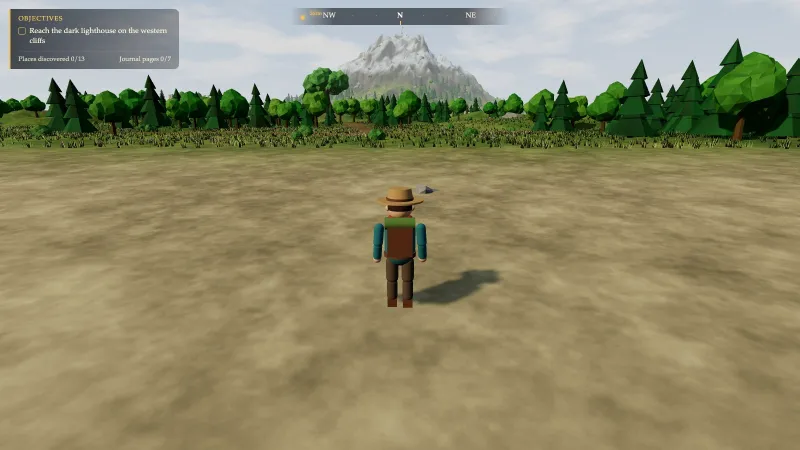
Lumen Isle
A castaway, a dark lighthouse and an island full of secrets: ring a lullaby on the garden bells and turn the temple’s mirrors to relight the Lumen.
51m 51s · $9.14 · 102 tool calls · 4,442 lines
Fable 5.1: 9 of 15
01Car showroom
All three sessions side by sideBuild a single-page website for selling a used classic sports car, with a 3D model of the car built in three.js (no downloaded model files). Visitors can orbit around the car, open the doors and the hood, change the paint colour, switch the interior colour, and press "Start engine" to hear it idle and see the exhaust. Make it look like a premium dealership page with price, specs and a contact form.
- Claude Haiku 5.5
Aurelio Classics, 1966 Velocca 275 GT Coupé ($489,000)
A dealership page with a hero, price card and spec table, and a stylised 3D coupé in the section below.
12m 44s · $0.58 · 32 tool calls · 1,187 lines
- Claude Sonnet 5.5
Hartwell & Vane Classic Motors, 1966 Brannock Veloce 4.2 Coupé ($138,500)
A dark showroom page where a coupé on a mirror floor is the hero, with a control dock along the bottom.
32m 36s · $2.31 · 31 tool calls · 1,171 lines
- Claude Opus 5.5
Ashcombe & Vale, 1965 Marlowe 4.2 Series I Roadster (£148,500)
A dark and gold dealership page with a roadster in a viewer, next to a panel for paint, interior, doors and engine.
24m 58s · $4.85 · 38 tool calls · 1,399 lines
02City builder
All three sessions side by sideBuild a small 3D city-building game in the browser with three.js. The player places roads, houses, shops and parks on a grid; houses need a road and a shop nearby to grow, and the city earns money over time. Include a day–night cycle, little cars driving on the roads, a budget, a population counter and sound effects.
- Claude Haiku 5.5
Little City
A small 16 by 16 city builder with roads, houses, shops and parks, a day and night cycle and a handful of cars.
12m 11s · $0.41 · 28 tool calls · 1,248 lines
- Claude Sonnet 5.5
Tiny Town
A 24 by 24 island city builder with roads that auto-join, three house levels, a full sky with stars and clouds, and synthesised music.
23m 09s · $3.23 · 55 tool calls · 3,274 lines
- Claude Opus 5.5
Smalltown
A 24 by 24 city builder that starts with a road coming in from the edge, growing houses, bloom at night and traffic that enters and leaves town.
17m 27s · $3.69 · 40 tool calls · 2,091 lines
03Space docking
All three sessions side by sideMake a 3D space game in the browser with three.js. Fly a small ship through an asteroid field to dock with a rotating space station before your fuel runs out. Include thrust and rotation controls, an on-screen HUD with speed, fuel and distance, collisions with asteroids, a docking sequence, sound, and three levels that get harder.
- Claude Haiku 5.5
Orbital Dock
A one-file game: fly a ship through rocks at a spinning hub station and steer into its docking tube.
12m 36s · $0.48 · 21 tool calls · 933 lines
- Claude Sonnet 5.5
Orbital Dock
A multi-file game: fly through a rock field to a spinning station, turn the docking checks green, and an autopilot pulls you in.
22m 06s · $2.92 · 49 tool calls · 2,128 lines
- Claude Opus 5.5
Haven Approach
A polished shuttle game: coast through a rock field to Haven Station, line up on the alignment panel, and a docking computer finishes the job.
25m 03s · $4.83 · 28 tool calls · 2,052 lines
08Retro platformer with a level editor
All three sessions side by sideMake a 2D retro platformer in the browser with a built-in level editor. The game has a player who can run, jump and wall-jump, enemies, coins, spikes, moving platforms and a goal flag. In the editor the player paints tiles and objects on a grid, then presses Play to test the level instantly. Include three ready-made levels, pixel-art graphics drawn in code, sound effects and music generated in code, and saving levels in the browser.
- Claude Haiku 5.5
Pixel Platformer Studio
A keyboard platformer with a simple tile editor and three themed levels.
23m 12s · $1.36 · 60 tool calls · 2,684 lines
- Claude Sonnet 5.5
Pixel Hop
A polished platformer with an editor that has a minimap, per-level music and file export.
30m 26s · $4.88 · 59 tool calls · 2,721 lines
- Claude Opus 5.5
Ledgewright
A well-finished platformer with springs, lifts, gamepad and touch support, and a share-code editor.
35m 42s · $7.24 · 51 tool calls · 3,700 lines